Wellness Compass
Personal build
Why it exists
My health data was scattered across devices and apps, and none of it was easy to reason about in one place. I wanted one secure home for it that an AI assistant could actually help me understand.
What it is
My personal health data hub. It collects data from Garmin and Withings onto a secure host and makes it available to AI assistants through read-only MCP (Model Context Protocol) tools. I also built a personal iOS app for it.
Who it’s for
Me. It’s a personal build, not a public product, and there’s no public site. I’m sharing it here as an example of owning your own health data and putting AI to work on it.
Key features
- Garmin and Withings in one place. Garmin daily health, sleep, recovery and workouts sit next to Withings measurements as one set of normalized events, with deterministic daily snapshots built on top.
- Garmin collection stays on the phone. Garmin sign-in and data collection happen inside the iPhone app. Credentials, cookies, identity fields, locations and routes are filtered out on the phone and never sent to the cloud.
- Ready for AI assistants. A remote MCP server offers 16 read-only tools: goals, daily snapshots, sleep, activities, body composition, trends, protocol and data freshness. ChatGPT, Grok and Cursor are on an explicit allowlist of clients that can connect.
- Read-only by design. The AI tools can’t write data, trigger a provider sync or rebuild snapshots. Every response is bounded by date windows, page sizes and a size cap.
- Protocol and dosing tracking. The app has a daily dose checklist and a weekly schedule. Each logged dose keeps a snapshot of exactly what was taken, and schedule edits are versioned with effective dates, so changing the plan never rewrites history.
- Coach buttons on the iPhone. One tap asks my AI coach to look at my latest activity, my latest weigh-in or today’s plan. The coach reads the details itself through the MCP tools and replies in its own chat.
- Data freshness built in. Each connector shows its last successful sync, its newest source timestamp and its latest error, so neither the AI nor I mistake stale data for current data.
- Privacy by default. There is one owner, self-registration is off, the app and repo hold no secrets, and logs keep counts and status codes for seven days but never health values or credentials. It’s a personal tool and doesn’t claim HIPAA compliance.
How it works
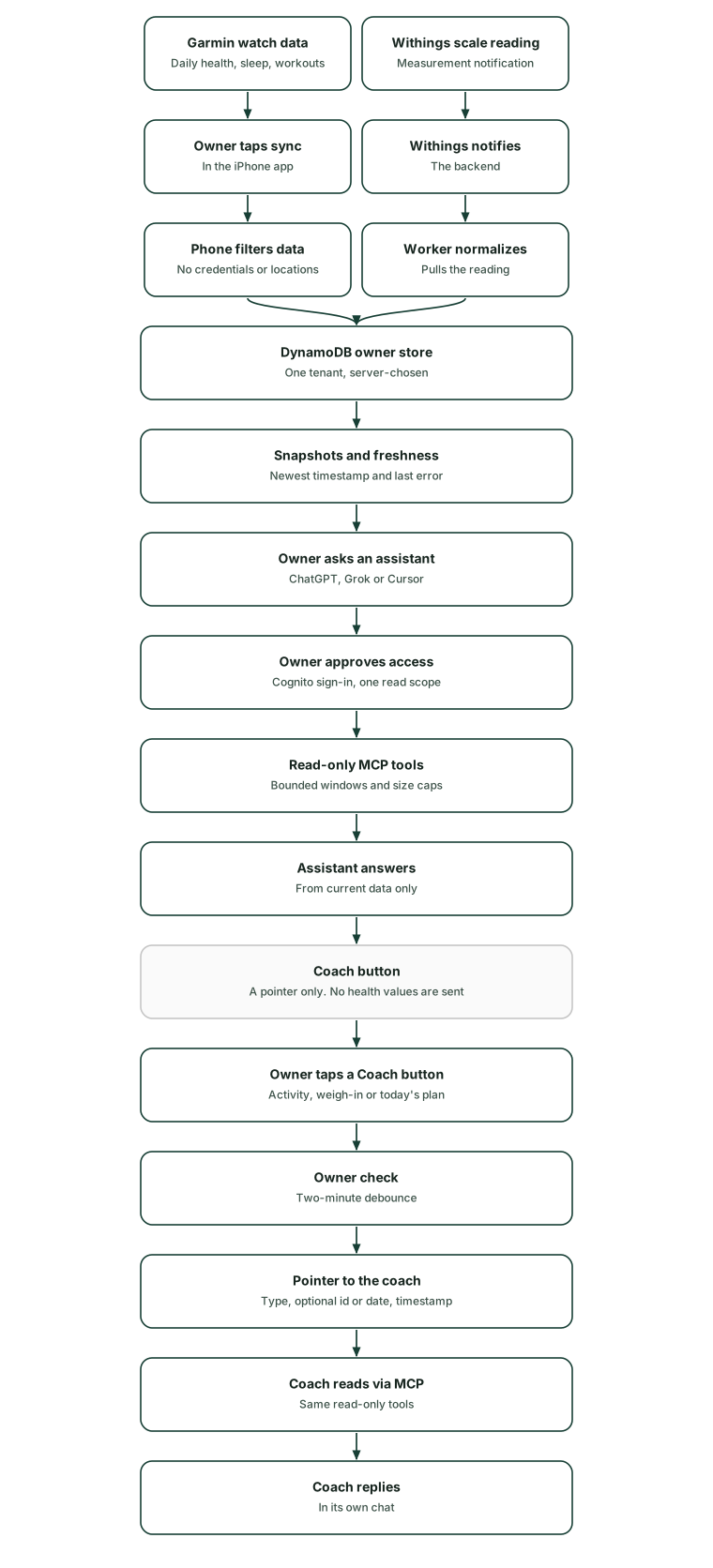
I open the Wellness Compass app on my iPhone and go to Connectors. I sign in to Garmin inside the app. The app collects up to two weeks of daily health, sleep and workout data and strips anything personal or sensitive on the phone. Then it uploads clean, normalized records to my private backend. My Withings scale works without me: when a new measurement arrives, Withings notifies the backend, which pulls the reading and stores it alongside the Garmin data.
Everything lands in one store that only I can reach. Signing in uses my owner account, and the backend checks every request against it. The same app holds my goals and my supplement and medication schedule. Each dose I check off is saved as a permanent record of what I actually took.
When I want to talk it through, I ask an AI assistant such as ChatGPT or Grok. The assistant connects through a standard sign-in flow, and after I approve it, it can read my recent data, goals and schedule. It can’t change anything.
For a quicker nudge, the app has Coach buttons: “Call Coach”, “Check my activity”, “Check weigh-in” and “What’s the plan for today”. Each one sends my AI coach a short pointer that contains no health data. The coach pulls what it needs through the same read-only tools and replies in its own chat.
Architecture
Overview
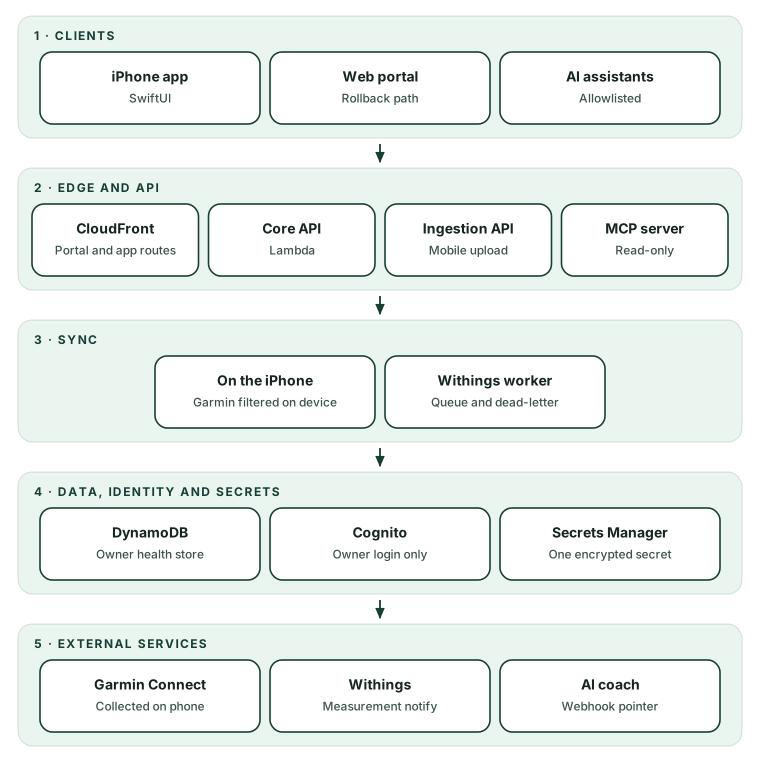
Wellness Compass is a serverless, single-tenant system on AWS, defined in AWS CDK as four separately deployable stacks: core API and provider workers, mobile ingestion, a web rollback portal, and the MCP server. Each stack gets only the permissions its job needs. Cognito handles owner sign-in. A native SwiftUI app is the main interface and reaches the backend through CloudFront. Garmin data is collected and filtered on the iPhone, and Withings data is pulled by a cloud worker when Withings sends a measurement notification. Both are normalized into one tenant-partitioned DynamoDB table. AI clients connect over a separate MCP stack, which puts a small OAuth 2.1 layer in front of Cognito and has read-only access to the data. The system has no always-on compute: it uses on-demand Lambdas, pay-per-request tables, queues with a dead-letter queue, and logs that expire after seven days.
Stack by layer
| Layer | What it uses |
|---|---|
| Clients | Native iPhone app built with SwiftUI; a React and Vite web portal kept as a rollback path |
| Edge and API | CloudFront in front of the static portal, forwarding app routes to API Gateway HTTP APIs; the MCP server has its own throttled HTTP API |
| Compute | AWS Lambda on Node.js 22 and ARM64, plus a container-image Lambda for the Garmin browser worker; SQS queues for Withings sync, with a dead-letter queue |
| Data | DynamoDB on demand: a tenant-partitioned table for health events, snapshots, goals and dosing; separate encrypted tables for Withings OAuth tokens and MCP OAuth grants; TTL cleanup |
| Identity | Cognito managed login with Authorization Code and S256 PKCE, an owner-only group and self-registration disabled; app tokens are stored in the iPhone Keychain |
| Integrations and sync | Garmin is collected on the iPhone in an isolated Garmin-only web view and filtered before upload; Withings uses OAuth, measurement notifications and manual pulls |
| MCP layer | A stateless Streamable HTTP MCP server with 16 read-only tools, behind its own OAuth 2.1 authorization layer: S256 PKCE, resource-bound tokens, one read scope and an allowlist of client ID metadata documents |
| Secrets | One encrypted Secrets Manager secret holds the provider app credentials and the coach webhook settings; each Lambda role gets only the access it needs |
| Deploy and IaC | AWS CDK in TypeScript with four separate stacks; XcodeGen for the iOS project; a written checkpoint and deployment ledger with recorded rollback points |
| Observability | CloudWatch Logs with structured, redacted audit events and seven-day retention; freshness status is shown in the app and exposed through MCP |
Design decisions
-
A read-only MCP surface. The MCP server lives in its own stack. Its role can only read the health table, and it can’t write, invoke workers or read provider secrets. An AI client is the least trusted caller, so it gets the smallest possible footprint. All 16 tools are marked read-only, and each has a fixed date window, record limit and response-size cap. AI assistants can’t log a dose or start a sync for me. Those actions stay in the app.
-
A thin OAuth 2.1 layer in front of Cognito, with an allowlist of client ID metadata documents. Cognito still handles sign-in. A small authorization layer adds what MCP clients expect: protected-resource and authorization-server metadata, S256-only PKCE, tokens bound to one resource, one read scope, and client ID metadata documents that must be on an HTTPS allowlist. It offers no dynamic client registration. Tokens are opaque, stored only as hashes, and refresh tokens rotate on every use. Cognito’s own metadata doesn’t advertise what MCP clients require. The allowlist keeps unknown clients out before the sign-in page loads. I own a small authorization server, and adding a new AI client means a reviewed code change and a deploy.
-
Garmin collection on the phone, behind a privacy boundary. Garmin sign-in, MFA and data collection run in the iPhone app. Filtering and normalization happen on the phone, and only bounded, flattened events are uploaded to a separate ingestion API. That API’s Lambda has no secrets access and runs with no internet route. Garmin credentials, cookies, raw responses, identity fields and locations never cross into AWS. Garmin sync needs me in the loop with the app open, and each collection covers at most two weeks.
-
Secrets live in Secrets Manager, never in the app or repo. Provider app credentials and the coach webhook settings share one encrypted secret. Each Lambda role gets only what it needs, and the console and MCP roles can’t read provider secrets. Withings user tokens live in a separate encrypted table. The coach webhook key is never sent to the phone. The iOS binary and the static portal contain no personal data or secrets. Rotating a key is a configuration change, not a deploy. Several components share one secret, so writers must preserve fields they don’t own, and tests enforce that.
-
Dose history is immutable. Each logged dose stores a snapshot of what was taken, taken from the schedule version in effect that day. Editing a schedule archives the old version with effective-from and effective-until dates. Changing the plan doesn’t change the past. History, analytics and the MCP tools all read the recorded dose and never work it out from the current schedule. The data model and validation are more complex, and older records need a defined fallback.
-
Single-tenant, owner-only scope. Access requires membership in the owner group and a match on the configured owner identity. The server always decides which tenant’s data a request touches, and callers never supply a tenant ID. Owner-only access is the right scope for a personal health hub. Supporting more users would need per-user mapping, new authorization tests and a fresh threat model.
-
A debounced, owner-only coach ping. Coach buttons call an owner-authenticated endpoint. It sends the AI coach’s webhook a small pointer: the request type, an optional activity ID or date, and a timestamp. A conditional write blocks repeats of the same type within two minutes and frees the slot if the webhook fails. No health values leave through the webhook. The coach has to fetch its own context, which adds a step before it replies.
Wellness Compass is a personal project, not a product or a medical service. If you’d like to talk about how it’s built, please get in touch with me.
Status and links
- Status: personal build, in use
- Public site: none
Get involved
If you’re interested in using it, contact me on LinkedIn.
Source code
Code lives in a private repository: github.com/ramybassem/wellness-compass (private, not publicly viewable).
This link shows a 404 page to visitors. That's by design: the repository is private, and this portfolio repo holds no product code.
Brand
- #173f35 forest
- #12473B iOS primary
- #245b4c secondary
- #EBF5F0 light
- #f2f4ef canvas
- #17251f ink