
TNTCalc
Simple. Fast. Built for T&T.
Why it exists
My sons, @twintumblerz, are deeply involved in trampoline and tumbling. Working out routine difficulty by hand is slow, especially for young athletes trying to understand their own routines. I built TNTCalc for them and their community, and it stays free as a giveback.
What it is
A free difficulty calculator for Trampoline (TR), Double Mini Trampoline (DMT) and Tumbling (TUM), on the web and iOS.
Who it’s for
Trampoline & tumbling athletes, coaches, parents and fans.
Key features
- Three disciplines, one keypad. Trampoline, Double Mini (DMT) and Tumbling, using FIG codes. A purpose-built keypad has position keys (tuck, pike, straight, split) and tumbling keys (roundoff, back handspring, whip, dash).
- Whole tumbling passes in one go. You type a full tumbling string and it’s parsed into individual skills. If a code or position isn’t valid, you get a clear message saying why.
- Build, reorder and export a pass. Skills add up to a running total DD, and you can drag rows to reorder them. A one-tap screenshot opens the iOS share sheet on iPhone or downloads a PNG elsewhere.
- Calculate without an account. The calculator works anonymously. You only need an account to save.
- Saved passes in the cloud. Save a new pass. When you edit a loaded pass, you can Override it or use “Save as” to keep a copy. My passes lets you load, search and delete.
- Shareable links. Turn any saved pass into a public link that anyone can open without signing in, and turn the link off again with Unshare. When someone opens a shared pass, it loads as their own editable copy.
- Full self-serve account. The profile holds first and last name, US state, and club or gym. You can change your password, reset a forgotten one, and delete your own account; deleting it also wipes every saved pass.
- Admin console. A Skills tab edits the difficulty catalog for each discipline without a code deploy. A Users tab can search accounts, lock and unlock them, grant or remove admin, and delete an account along with its passes.
- Mobile-first, plus a native iOS app. The layout is built for phones at the gym. The iOS app wraps the same site, and an install banner appears only in mobile browsers, never inside the app. Privacy and Support pages are published.
How it works
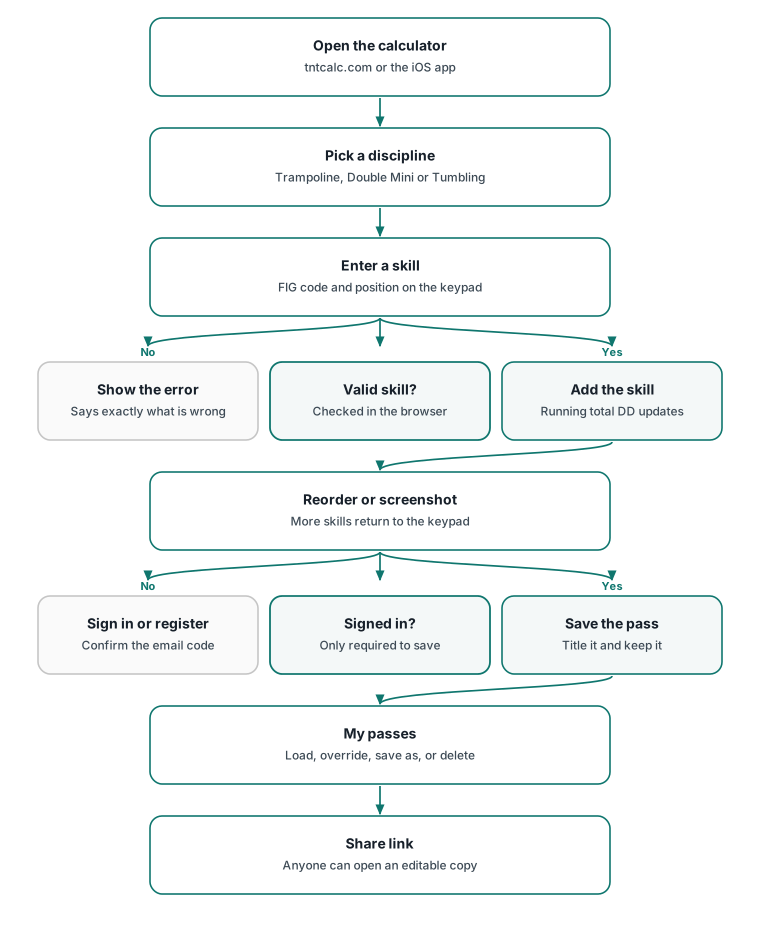
You open tntcalc.com in a browser or open the TNTCalc iPhone app, which loads the same site. Pick a discipline: Trampoline, Double Mini or Tumbling. Type a skill’s FIG code on the keypad, add a position such as tuck, pike or straight, and tap Add Skill. TNTCalc looks the skill up in its difficulty catalog and adds it to your skill list with its DD, keeping a running total. For tumbling, you can type the whole pass at once and TNTCalc splits it into individual skills. If something isn’t valid, for example a position a skill doesn’t allow, it tells you exactly what’s wrong.
You can drag skills to reorder them, remove any you don’t want, or tap Screenshot to share an image of the pass.
None of this needs an account. To keep a pass, sign in or register with your email. You’ll confirm your address with a code that’s sent by email. Give the pass a title and tap Save. It then appears in My passes on any device where you sign in. You can load it later and either overwrite it or save a new copy. You can also tap Share to get a link a coach or teammate can open without an account. They get their own copy to edit.
In Profile you can add your name, state and club, change or reset your password, or permanently delete your account and all of your saved passes.
Difficulty values follow published USA Gymnastics and FIG numbers on a best-effort basis. Check results against official sources.
Architecture
Overview
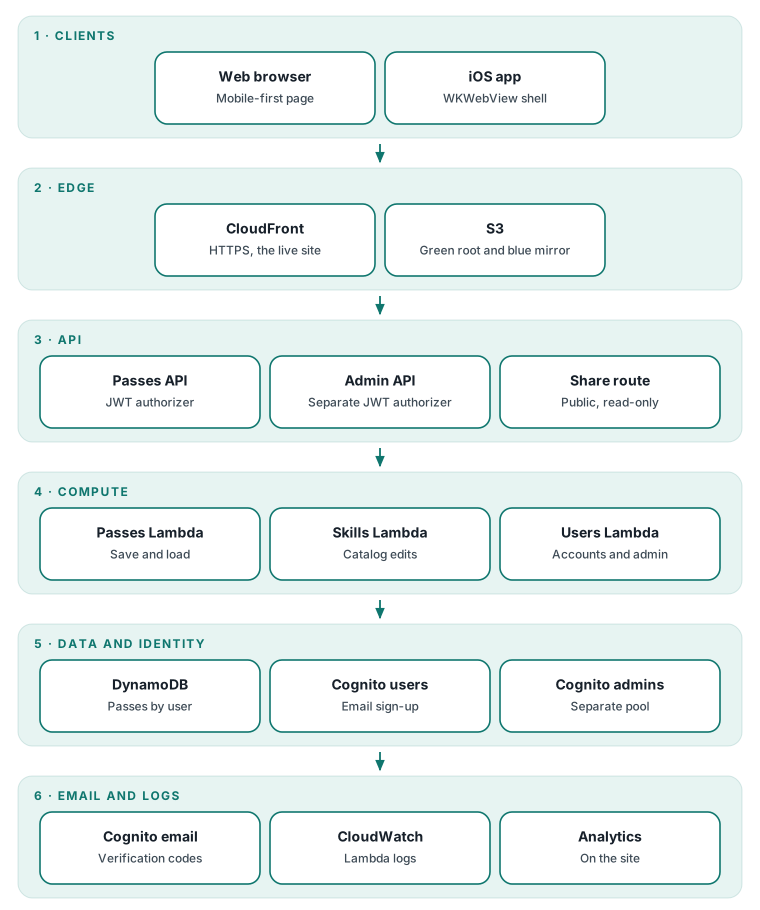
TNTCalc is a serverless, static-first web app on AWS. All difficulty calculation runs in the browser against a JSON skills catalog, so the core product needs no backend and works for anonymous users. A small set of purpose-built services is added only where state is needed. Amazon Cognito handles identity, with separate user and admin pools. Two HTTP APIs on API Gateway, each with a JWT authorizer, sit in front of three single-purpose Node.js 24 Lambdas, and DynamoDB stores saved passes. The site is served from S3 through CloudFront. Production is the root of the site (green), and a full mirror at a blue path is used for validation before changes are promoted by hand. The iOS app is a deliberately thin WKWebView shell, so web and app ship from one codebase. Every resource uses a dedicated tntcalc name prefix and is isolated from my other products. Work is tracked as Linear tickets and run through a written AI-handoff and deploy-gate protocol, so changes are traceable and deployments are recorded with evidence.
Stack by layer
| Layer | Technology |
|---|---|
| Clients | Vanilla HTML, CSS and JS single-page web app (mobile-first); native iOS app (SwiftUI and WKWebView shell, iOS 17+) loading tntcalc.com |
| Edge / CDN | Amazon CloudFront (HTTPS redirect, HTTP/2, TLS 1.3 minimum) |
| Static hosting | Amazon S3 with versioning; green at the root, blue mirror on a separate path |
| API | Amazon API Gateway HTTP APIs (one for passes, one for admin) with Cognito JWT authorizers; one public read-only share route |
| Compute | AWS Lambda, Node.js 24, AWS SDK v3: passes API, skills admin, users admin |
| Data | DynamoDB on-demand (user ID and pass ID key, secondary index for share links); skills catalog as a JSON file in S3 |
| Identity | Amazon Cognito: dedicated end-user pool (email sign-up, verification, custom club and state attributes) and a separate admin pool with an admin group |
| Cognito's built-in default email sender for verification and password-reset codes | |
| Deploy | Manual blue-to-green promotion with the AWS CLI (S3 upload plus CloudFront invalidation), guarded by a handoff-ledger deploy gate, with smoke tests after each deploy |
| Observability | CloudWatch Logs for each Lambda and Google Analytics on the site |
Design decisions
-
Calculation runs in the browser against a data file. The calculator is instant, works without an account, keeps working if the API is down, and makes no server call per calculation. Difficulty values live in a JSON catalog, not in code. Anyone can read the catalog. Correctness depends on the catalog being right, so the site carries a disclaimer telling users to check results against official sources.
-
Admins edit the catalog through a group-checked Lambda. Difficulty values change. Admins update them in a Skills tab, and a Lambda validates the document structure, stamps who changed it and when, and writes it to S3. No code deploy is needed. The Lambda writes the production catalog and mirrors it to blue in the same step, so catalog edits skip the blue-first validation that code changes go through. S3 versioning is the safety net.
-
Separate Cognito pools for users and admins. Admin rights are kept apart from the public sign-up pool. Admin APIs need a token from the admin pool and membership of the admin group, and the skills Lambda checks the group again itself. There are two pools and two app clients to run. Making a user an admin means creating a matching identity in the admin pool, which the users-admin Lambda does.
-
Data is partitioned by user, and sharing is an opt-in public index. Passes are keyed by the user ID taken from the verified token, so a user can only reach their own records. A share creates a short random ID that a secondary index looks up through one public, read-only route that returns only the pass content. Unshare removes the ID. Anyone who has a link can view that pass, which the privacy policy states. Deleting an account has to clear the passes first and then the Cognito user, which is two separate steps rather than one transaction.
-
Blue/green as path slots in one bucket and one distribution. The blue path is a byte-for-byte mirror where changes are checked on real devices at the real domain before being promoted by hand to the root. Rollback restores the previous S3 object versions, which are recorded in the deploy plan. Blue and green share the same Cognito pools, API and table, so blue checks the front end, not isolated backend changes. Promotion is a manual step.
-
The iOS app is a thin WKWebView shell over the live site. There’s one codebase, and every web deploy reaches app users immediately with no App Store review. The shell keeps tntcalc.com and Cognito pages in the app, opens other links in Safari, keeps sign-in between launches, and adds pull-to-refresh. It needs a network connection and has no offline mode. Native features are minimal.
-
App install prompt that never appears in the app. Mobile Safari shows Apple’s native Smart App Banner. Other iOS browsers get a custom banner that shows only when the browser identifies itself as a known third-party iOS browser. The app’s WKWebView doesn’t identify itself that way, so it never sees a banner, and no new app build was needed. Dismissing the banner hides it for 21 days. Detection relies on user-agent heuristics. Unknown in-app browsers are treated as in-app and get no prompt.
Changes are tracked as Linear tickets and go through a written AI-handoff protocol, a checkpoint ledger in the repo, so different coding tools can pick up work safely without relying on chat history. A deploy gate script refuses to proceed unless the ledger is in its ready-to-deploy state with explicit authorization, a committed change, a clean worktree, and a complete pre-deployment record that covers the target, command, validation, rollback plan and smoke-test plan. A deployment is recorded as verified only after post-deploy smoke tests pass.
Status and links
- Status: live and free
- Web: tntcalc.com
- iOS: TNTCalc on the App Store
Get involved
Try it at your next practice and send feedback through the site’s support page or on LinkedIn. You can also follow and support my sons’ journey at @twintumblerz.
Source code
Code lives in a private repository: github.com/ramybassem/tntcalc (private, not publicly viewable).
This link shows a 404 page to visitors. That's by design: the repository is private, and this portfolio repo holds no product code.
Brand
- #0f766e teal
- #006c6c icon teal
- #1e3a8a navy
- #f59e0b amber
- #f6f8fb mist