
MemSynk
Your AI. In sync. Always.
Why it exists
Every AI tool keeps its own memory, so switching tools means starting over, and your context ends up locked inside one platform. I believe your context should belong to you and move with you.
What it is
An AI memory tool. MemSynk keeps your context, decisions and next steps in private ledgers that your AI tools can all read from and save back to, so the next tool picks up where the last one left off.
Who it’s for
People who work across several AI tools, such as ChatGPT, Grok and Cursor, and want one memory they own instead of starting over in each.
Key features
- You own your AI context. Your notes live in a private service that runs in your own cloud account, not inside any single AI vendor’s chat history. MemSynk never runs AI models of its own; it only stores and serves what your tools save.
- Ledgers: structured, shared memory. Each subject gets a ledger. A topic ledger tracks a life or business topic (current situation, decisions, open questions, next steps). A code ledger is a handoff record for a software project: tasks, architecture, how to deploy and the exact next step.
- Move between AI tools without starting over. Start in one tool and continue in another. ChatGPT and Cursor are verified reading and writing. Grok is connected and has loaded context, with saving still being tested. Claude and Codex are coming.
- One standard connector. MemSynk is an MCP (Model Context Protocol) server. You paste one server address into any MCP-compatible tool, sign in, and approve. There’s no API key to copy and no client secret to manage.
- You decide what each AI can see. Every connection gets a name and its own list of ledgers, read-only or read-and-write. You can change or revoke it at any time from the Connections page, and the change applies on the AI’s next request.
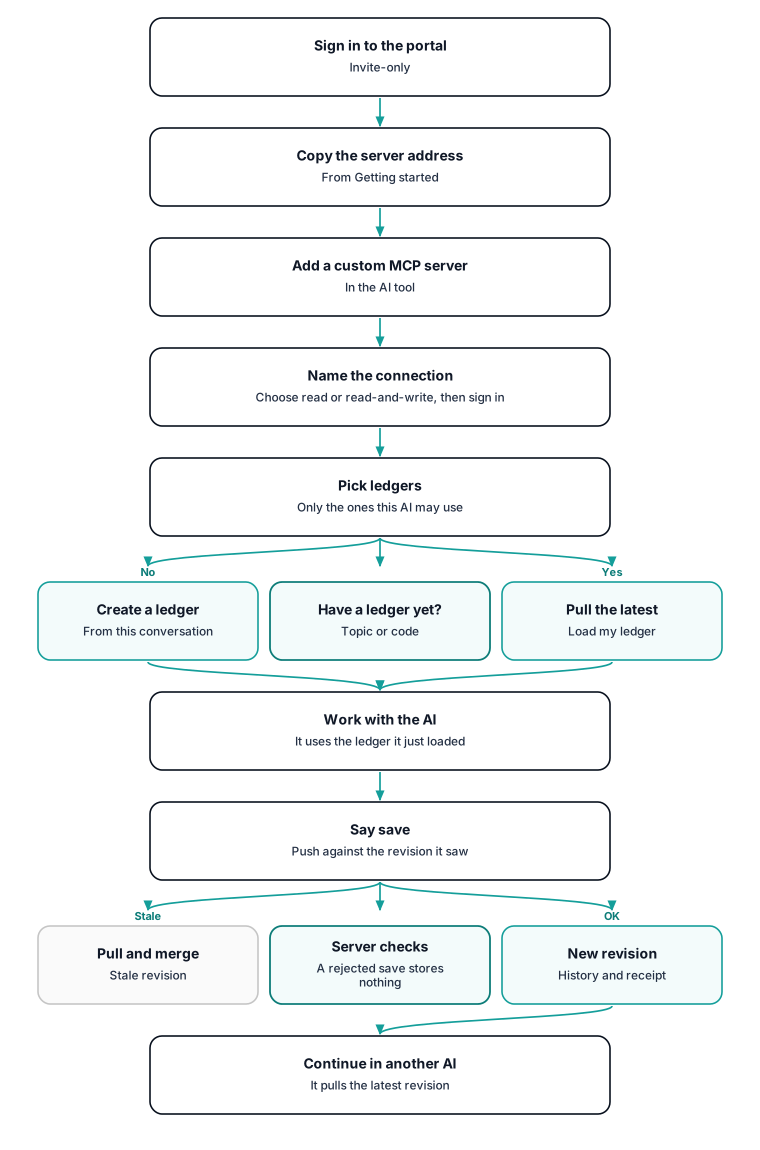
- Nothing is silently overwritten. Every save creates a new numbered revision with its history. If two AIs edit at once, the second one is told to pull and merge rather than clobber the first. You can compare and restore old revisions.
- Secrets are blocked at the door. Every save is scanned for passwords, API keys, tokens and private keys. A save that contains one is rejected and nothing is stored.
- A guided start. The Getting started page explains the idea and walks you through connecting your first tool. Ready-made prompts such as “load my ledger” and “standing instructions” fill in your ledger’s title and id with one click.
- See which AI did what. My activity shows saves, pulls, conflicts and errors by tool and by bot name over time, and never shows ledger content.
How it works
You sign in to the MemSynk portal. Accounts are invite-only. The Getting started page gives you one server address. In your AI tool you add a custom MCP server (some tools call it a plugin or a connector) and paste that address. MemSynk then asks you to name the connection, choose read-only or read-and-write, sign in, and tick the ledgers this AI may use. To check it works, you ask the AI to list your MemSynk ledgers.
To start a ledger, you ask an AI that already knows the subject to create one from the conversation. It fills in a fixed template: topic ledgers have current situation, decisions, open questions and next steps, and code ledgers have tasks and a ten-part checkpoint. Anything it doesn’t know is written as “Unknown / not yet verified” rather than guessed.
From then on, any connected AI pulls the latest revision before it works and pushes an update when you say “save”. Each save goes up against the revision the AI last saw, so a stale save is caught instead of quietly overwriting newer work. When you switch tools, the new tool pulls the same ledger and carries on from the latest state. The portal lets you read every ledger, browse its revisions and history, and see which connection made each change.
Architecture
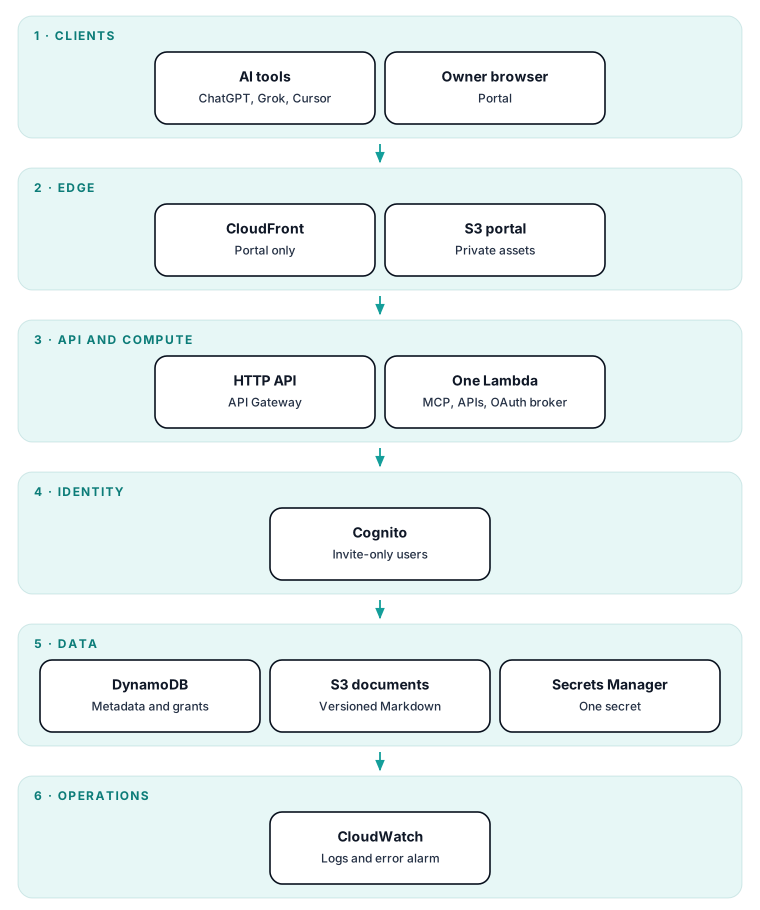
MemSynk is a serverless, single-tenant-per-deployment service on AWS, built so the system holds nothing between requests. One function serves the MCP endpoint, the agent and portal APIs, and an OAuth broker. All of them call one shared domain core that owns validation, authorization, secret scanning and publication, so no entry point can bypass the rules. Markdown documents are immutable, hash-verified objects in versioned storage. Metadata, revision manifests, history indexes and idempotency receipts live in a single on-demand table accessed only through key lookups. Identity comes from an invite-only user pool. AI tools connect over standard OAuth with PKCE and per-connection ledger grants. Infrastructure is defined as code and deployed through a guarded script that checks the infrastructure against guardrails, shows a diff and records a rollback point before every release.
Stack by layer
| Layer | Implementation |
|---|---|
| Portal | React and Vite single-page app; private object storage served only through CloudFront; dark and light themes, mobile-responsive |
| MCP server | Official MCP TypeScript SDK; 11 tools (template, create, list, pull, read document or history, search, status, instructions, push) |
| Auth / OAuth | Amazon Cognito (managed login, invite-only, owner and admin groups); MemSynk's own OAuth broker with PKCE (S256), client metadata documents for ChatGPT, Grok and Cursor, two-stage consent, rotating refresh tokens with reuse detection, revocable per-connection grants |
| Compute | One AWS Lambda function (Node.js 24, arm64) behind an HTTP API; no servers, VPC, queues, scheduled jobs or backend AI calls |
| Data | Amazon S3 (versioned, encrypted, private) for Markdown; one on-demand Amazon DynamoDB table with point-in-time recovery for metadata, manifests and receipts; one consolidated secret in AWS Secrets Manager |
| Revisions and history | Immutable per-revision manifests (object keys, SHA-256, sizes); optimistic concurrency on the base revision; durable idempotency receipts; deduplicated, stable-ID history; restore creates a new revision |
| Secret scanning | Server-side scan of every string field on every write before anything is uploaded; the same scanner guards the local agent outbox |
| Deploy and rollback | AWS CDK; scripted synth, infrastructure guardrail check, diff, deploy, then portal upload; a pre-deploy git tag plus the recorded function code hash before every release; stop if the diff would replace the user pool |
| Observability | Content-free structured logs; a CloudWatch error alarm; per-owner activity events with daily rollups; My activity for every user and counts-only admin analytics |
Design decisions
-
Revisioned ledgers with optimistic concurrency and idempotency. Every write names the base revision it was based on and carries an idempotency key. A write against an old revision is rejected as a conflict. Several AIs write to the same ledger, often over unreliable connections, so retries must be safe and lost updates impossible. There’s no automatic merge, so a stale writer must pull, merge and resend.
-
Bodies in object storage, metadata in one table, published in one transaction. Markdown is written as immutable, hash-checked objects first. Then the revision head, manifest, history and receipt are committed in one atomic table transaction. Readers only ever see a complete revision, large bodies stay out of the database, and every read can be integrity-checked. A failed commit can leave unreferenced uploads, which need careful manual cleanup. Transaction limits cap each save.
-
Per-connection, per-ledger grants, checked on every request. Each OAuth connection has an owner-chosen name and its own read, write and create rights per ledger. Access tokens carry only a grant reference, and access is read fresh on every call. The AI client can never widen its own access, and an owner’s edit or revoke takes effect on the very next request without re-consent. Ledgers created later must be added to existing connections deliberately.
-
Secret scanning on every write. Reject, don’t redact. Any credential-shaped value in documents, history, summaries or metadata fails the save with the location and rule, never the value. Ledger content is replayed into prompts across many tools, so a leaked key would spread quickly. The rules must avoid false positives on prose and documentation examples, and occasionally a user must rephrase.
-
The agent name is a label, never authorization. Bots may say who they are, but every revision is stamped with the verified actor from the OAuth grant. Without a name, activity is attributed to the connected app, for example “Cursor (client)”. Names are unverified and could be spoofed within one connection, so they’re shown only for attribution and never change access.
-
Tenant isolation by key design, with invite-only users. Every record and object key is built from the signature-verified user identity, never from request data. Sign-up is closed and accounts are created by an admin. Disabling or deleting a user blocks their tokens immediately, and deletion purges all data. Any future sharing feature will need a deliberate new design.
-
Activity rollups instead of indexes; admin analytics show counts by default. Each operation writes a content-free event plus small daily counters. Admin views read per-day rows with one partition query, and other users’ ledgers appear only as counts unless the deployment opts into names. Counters are fixed dimensions decided up front.
Status and links
- Status: invite-only
- Web: memsynk.com
Get involved
MemSynk is invite-only right now. If you’d like an invite, message me on LinkedIn.
Source code
Code lives in a private repository: github.com/ramybassem/memsynk (private, not publicly viewable).
This link shows a 404 page to visitors. That's by design: the repository is private, and this portfolio repo holds no product code.
Brand
- #08101d night
- #55dfdb teal
- #b394f6 violet
- #53a6f8 blue
- #101827 ink